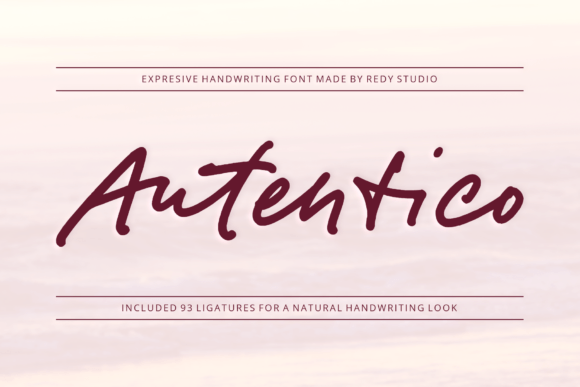
Autentico: A Handwritten Font That Elevates Web Design
There’s something special about the first time a font truly feels like it belongs on your site. For me, that moment came when I tested Autentico in the hero section of a boutique online store. The handwritten charm of this script font brought warmth and personality to a space that needed just that—something human, something real.
What Is Autentico?
Autentico is an enchanting handwritten font from Script Amp, designed to feel both elegant and approachable. It has that effortless, flowing quality that mimics real pen strokes, making it perfect for adding a personal touch to digital designs. As a web designer, I appreciate how its character curves and subtle variations give each letter a unique feel, avoiding the flatness of generic fonts.
This is not just any script font—it’s a premium typeface with a wide spectrum of applications. Whether you're designing a landing page, a product banner, or a call-to-action button, Autentico adds a layer of visual storytelling that can’t be ignored.
Testing Autentico in Real Web Layouts
I used Autentico on a few different projects to see how it performed across various contexts. On a creative portfolio homepage, I placed it as the main headline over a full-screen image of a studio. The contrast between the bold, flowing script and the background created a strong visual hierarchy that immediately drew attention.
On a mobile preview, the font scaled beautifully without losing its character. Even at smaller sizes, the legibility was impressive—especially considering how many script fonts struggle with readability on screens. When layered over dark backgrounds, I found that using a slightly lighter color helped maintain clarity without sacrificing style.
One of my favorite uses was for a course sales page. I paired Autentico with a clean sans serif font for body copy, which gave the design a balanced look. The decorative script worked well for headlines, while the simple sans serif handled the longer text blocks effortlessly.
Where Autentico Shines Online
Autentico is best suited for short phrases, titles, and decorative accents. It works exceptionally well for hero sections, landing page headlines, and call-to-action buttons. Its personality makes it ideal for branding that wants to feel personal, artisanal, or handcrafted.
For example, I used it on a blog header where the title read “Crafted with Care.” The font added a sense of authenticity that aligned perfectly with the brand's message. It also looked great on a boutique online store’s product banners, where it helped highlight limited edition items with a touch of elegance.
However, it’s important to note that Autentico isn't meant for long paragraphs or dense text areas. Its decorative nature makes it unsuitable for body copy or navigation menus. Always pair it with a more readable font for supporting text to ensure your website remains accessible and easy to scan.
Font Pairing Tips for Web Design
When working with Autentico, I recommend pairing it with a clean sans serif font for body text. This combination allows the script font to shine as a display element while keeping the rest of the content clear and professional. A good match would be something like Montserrat or Lato for a modern, minimalist feel.
If you’re going for a more traditional or editorial look, a simple serif font like Georgia or Merriweather can work well too. The key is to let Autentico stand out as the primary visual element without overwhelming the user experience.
Also, don’t forget to check if the font includes alternate characters, ligatures, or swashes. These features can help you create more dynamic and visually engaging designs, especially for logos or promotional graphics.
Considerations Before Using Autentico
Before implementing Autentico into a live project, make sure you have the proper commercial font license. This is especially important if you're building a client website, selling digital products, or creating templates that will be used by others.
Additionally, verify that the font supports the languages and characters you need. While Autentico looks fantastic in English, it’s always good to double-check if it covers other alphabets or symbols relevant to your audience.
Finally, test how the font performs in different environments. Check loading times, responsiveness on mobile devices, and compatibility with dark mode settings. A well-optimized font can enhance your design without slowing down your site.